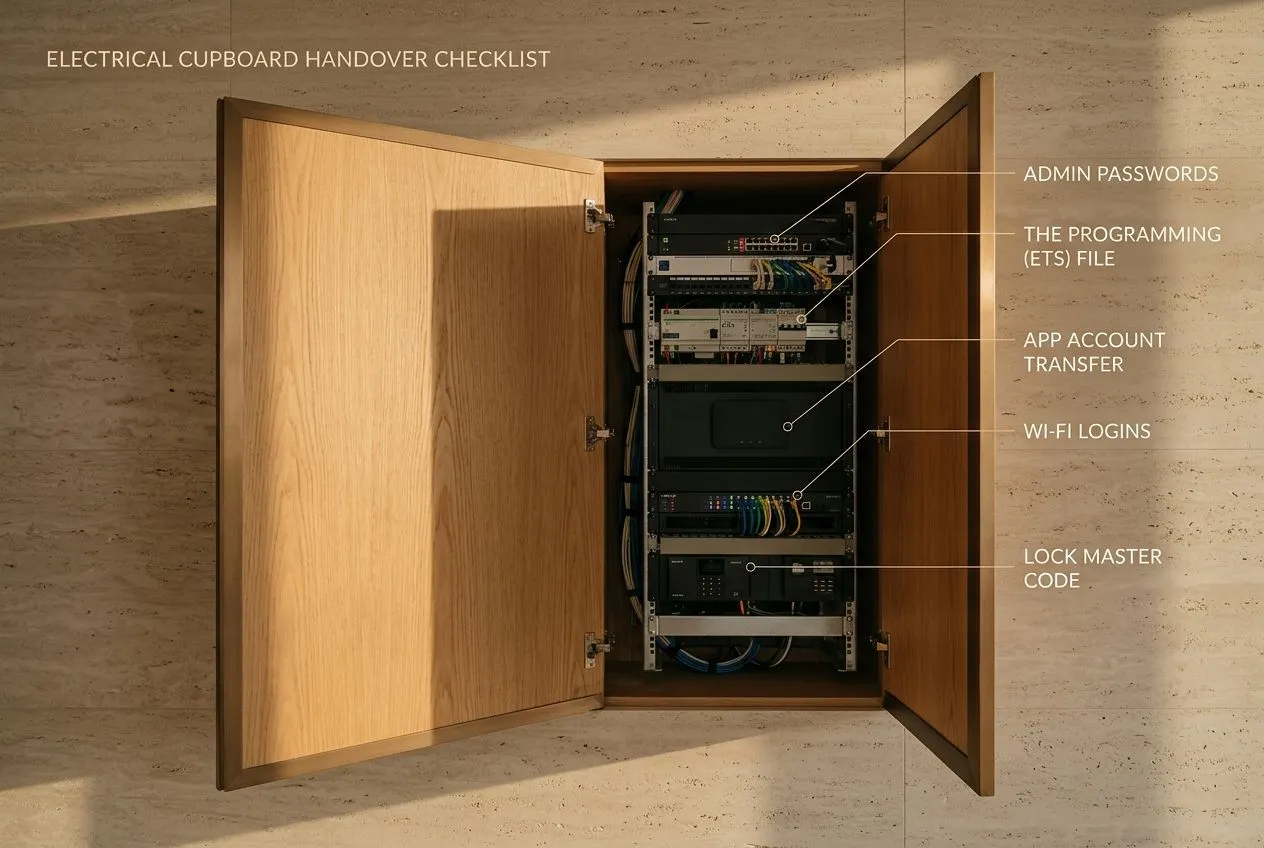
If you're buying a house with a smart home system, or renting one, get three things handed over: the admin passwords, the programming file and the app accounts. Then remove the previous owner's access to everything, from the app to the front door lock.
If the passwords or files are missing, you can still take control. We can rebuild the setup so that you hold every login and a copy of the file.
This guide covers what to check before you buy, what to ask for, what to change in your first week and how to keep an older system working.
Can you have the system checked before you buy?
Yes. We carry out pre-inspections for buyers, so you know what you are taking on before you complete.
Before you complete, find out three things: whether the passwords and programming file still exist, who installed the system, and whether anything has already stopped working. If you know the brand name on the keypads or the hub, tell us when you get in touch.
What should you ask the seller or landlord for?
Ask for everything the last owner used to run and change the system. Buyers can add this to the handover list. Tenants should ask the landlord or agent.
- The admin or installer passwords for the hub (the small box that runs your system) and any controller in the electrical cupboard
- The programming file. On a KNX system (the wiring standard most wired systems use), this is the ETS project file, made in the software KNX engineers use to set up a home
- Logins for the app, and a transfer of the account into your name
- The Wi-Fi router and network logins
- Master codes and the user list for any smart locks
- The login for the camera recorder and the intercom
- Drawings, a wiring schedule, manuals and any warranty papers
- The name and phone number of the company that installed it
Why does the programming file matter so much?
The programming file holds every setting in your home: which button dims which light, what each scene does, when the blinds close. Without it, you can use the system as it was left, but you cannot change it.
We see this often when someone moves into a home with an older system. Nobody has the passwords or the file, so nothing can be adjusted, added or upgraded. The fix is a full reprogramming that creates a new file you own and can use.
What should you change in your first week?
Change every login that the previous occupants or their installer could still use. Until you do, someone else may still be able to control your home from their phone.
- Remove old users from the app, and from any Amazon Alexa, Google Assistant or Apple Siri accounts linked to it
- Delete old lock codes, fingerprints and cards, then set your own. Our smart door locks guide explains how locks handle codes and backup keys
- Change the passwords for the camera recorder and the intercom
- Change the Wi-Fi name and password, then reconnect your devices
- Find out whether an installer still has remote access, and switch it off if you don't need it
What if the passwords or files are missing?
Try the original installer first. Look for their name on the hub, the electrical panel or the old paperwork, as they may still hold the file.
If they have closed down or can't help, we rebuild the configuration, and you always get a copy. On a wired system with no project file, we rebuild the setup and replace the hub with Symphony, Avario's automation platform, designed to make large, complex homes easier to manage. You decide whether your existing keypads and switches stay or get replaced.
We can take on any system, though we tend to stick to KNX and other standardised systems. Avario is a registered KNX Partner, and our own team does all the programming. Our guide to taking over a system from another installer goes through the process step by step.
How can you tell if an older system needs attention?
Look out for things that used to work and now don't, or only work some of the time. These are the usual signs:
When another company installed your system, we always start with a health check before fixing the fault you reported. It includes a system check and analysis, a thermal camera (FLIR) scan to find hot spots, and a full Wi-Fi signal analysis using UniFi tools.
- A voice assistant that no longer responds
- Scenes in the app that do the wrong thing, or don't run at all
- Camera feeds that freeze or drop out
- Wireless sensors, blinds or locks going offline
- Keypad labels that no longer match the rooms or what the buttons do
- Wi-Fi that drops in some rooms. Our home Wi-Fi guide explains the usual causes
What does our handover service include?
When we take over a system, you get it back clean and fully documented. As standard, that includes:
- Removing old users and resetting every login
- Written records of what is installed and how it is set up
- Drawings and a wiring schedule
- The ETS project file on KNX systems, and all passwords
- A training session for everyone in the household
How do you keep an older system reliable after you move in?
Regular checks and a simple way to report faults keep an older system working. Every maintenance plan we write is based on what your home needs, not a fixed package. Our guide to smart home repair and maintenance shows what a plan can cover.
Once we look after your system, the Avario app runs a watchdog, a dedicated check that makes sure everything is running as it should. The app also has a support chat. If another company installed your system and you don't have our app yet, call us on +971 4 458 2205, Monday to Saturday, 8am to 7pm.
We do most of our support remotely. You approve each remote session, and you can switch remote access off completely.
Your system doesn't need the internet to run your home. If the internet goes down but your Wi-Fi still works, the app still controls the home while you're inside it. If the home network goes down as well, the keypads keep working.
Renting? What tenants should know
You can contact us directly as a tenant. Tell us you rent when you call. Depending on your situation, we may need your landlord to get in touch or agree first.
Ask your landlord for the same list a buyer would get: passwords, the programming file and the app accounts. The system belongs to the property, so agree any rebuild or upgrade with your landlord before work starts.
Questions people ask
Can I live with the system if I can't get the passwords? For day-to-day use, usually yes. The switches and keypads keep doing what they were set to do. You can't change scenes, add devices or upgrade until you have the file or the system is reprogrammed.
Do I get a copy of the new programming file? Yes. When we rebuild a configuration, you always get a copy. On KNX systems, we hand over the ETS project file and all passwords as standard.
Do you work on systems another company installed? Yes. Most of our work is on KNX and other standardised systems, so tell us the brand on the keypads or hub when you get in touch.
What affects the cost of taking over a system? It depends on whether the files and passwords still exist, whether the system is wired or wireless, the size of your home and how much it controls. A full rebuild with a new Symphony hub takes more work than resetting logins, and after a home visit our engineer can tell you which one you need.
Next step: book a home visit
Book a home visit or engineering survey and tell us what you know about the system, even if it's only the brand name on a keypad. We get in touch the next business day to arrange it. After our engineer has checked the system in person, you get a written quote, usually within 2 days.